UNITY:擴展編輯器
唔,稍微聊一下unity中扩展编辑器的相关内容。
UNITY:擴展編輯器
Section titled “UNITY:擴展編輯器”为什么要用unity
Section titled “为什么要用unity”基本上,游戏开发大概用啥都可以,能做出想要的效果就好,用unity大概只是因为unity有一些其他引擎没有的优点。
比如相对而言对“小白”更友好,更符合直观逻辑等,不过可能主要还是最近工作使用的是Unity引擎,毕竟屁股决定脑袋。

但是对于一个入门的新人来讲,不总是需要挑一个来用用看的吗,所以选Unity也还不错。
为什么要扩展编辑器
Section titled “为什么要扩展编辑器”首先,并不是所有人的计算机科班出生,有编程基础,可能对于从事设计的同学来讲,去了解底层代码的运作是代价很大的,去亲自编写逻辑代码,生产和维护是成本昂贵的。
所以会有专门的程序来做一些脚手架或者中间层之类的东西,为策划提供出编辑上的接口,来简化修改这个过程。
接下来我们就来正式的聊聊如何扩展Unity的编辑器。
当然如果需要详细且细致step by step的过程介绍,可以看参考里面的一些介绍,总体来看我们可以定义Unity编辑器对一些数据在Inspector的渲染过程,也可以自己新建一个窗口。
ImGUI概述
Section titled “ImGUI概述”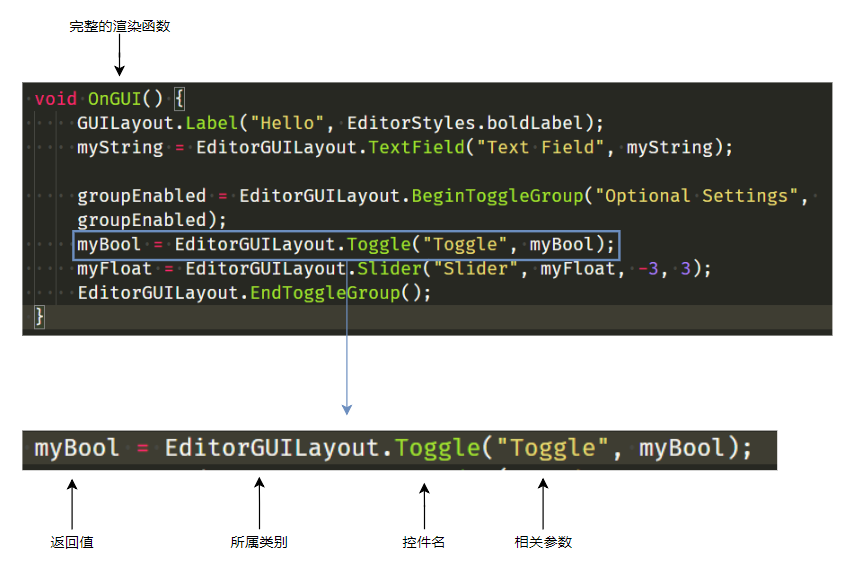
咱也算是写过诸如Web,UWP等等等UI系统的,然后Unity里面的这套管叫ImGUI,名字的意识大概是立即UI,是给个返回值的那套UI,所以我们要记得最后把值赋值回去。
扩展Inspector
Section titled “扩展Inspector”Inspector上是可以显示附上的代码的一些public字段的,对于一些复杂的数据类型的实例,或者对于一些我们希望自定义渲染行为的数据,还是有方法可以自定义他的渲染过程的。
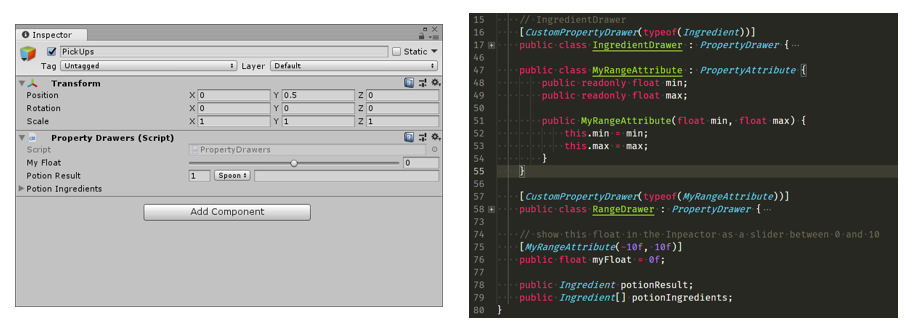
大概的思路是实现一个继承于PropertyDrawer的渲染特定数据类型的实例,并重写函数实现对应的渲染过程,贴个例子代码:
    // Custom serializable class:加 [Serializable] 后,Unity 才能在 Inspector 中展开字段。    [Serializable]    public class Ingredient {        // public 字段会被 Unity 序列化;也可以用 [SerializeField] 标记 private 字段。        public string name;        public int amount = 1;        public IngredientUnit unit;    }
    // IngredientDrawer:告诉 Unity 用这个 Drawer 绘制 Ingredient 类型。    [CustomPropertyDrawer(typeof(Ingredient))]    public class IngredientDrawer : PropertyDrawer {        // Draw the propery inside the given rect        public override void OnGUI(Rect position, SerializedProperty property, GUIContent label) {            // Using BeginProperty / EndProperty on the parent property means that            // prefab override logic works on the entire property.            EditorGUI.BeginProperty(position, label, property);
            // Draw label            // PrefixLabel 会绘制字段名,并返回剩余可用于自定义字段的区域。            position = EditorGUI.PrefixLabel(position, GUIUtility.GetControlID(FocusType.Passive), label);
            // Don't make child fields be indented            // 暂存缩进层级,避免自定义绘制影响后面的 Inspector 项。            var indent = EditorGUI.indentLevel;            EditorGUI.indentLevel = 0;            // Calculate rects            // IMGUI 需要手动计算每个字段的矩形区域。            var amountRect = new Rect(position.x, position.y, 30, position.height);            var unitRect = new Rect(position.x + 35, position.y, 50, position.height);            var nameRect = new Rect(position.x + 90, position.y, position.width - 90, position.height);
            // Draw fields - pass GUIContent.none to each so they can draw with labels            // FindPropertyRelative 通过字段名访问 Ingredient 内部的序列化子字段。            EditorGUI.PropertyField(amountRect, property.FindPropertyRelative("amount"), GUIContent.none);            EditorGUI.PropertyField(unitRect, property.FindPropertyRelative("unit"), GUIContent.none);            EditorGUI.PropertyField(nameRect, property.FindPropertyRelative("name"), GUIContent.none);
            // Set indent back to what is was            EditorGUI.indentLevel = indent;
EditorGUI.EndProperty(); } }这个就也很简单了,大概是写个渲染函数留个入口就可以了。
    // Add menu item named "My Window" to the Window menu    [MenuItem("Jsky/HelloWorld")]    public static void ShowWindow() {        //Show existing window instance. If one doesn't exist, make one.        // GetWindow 会复用已有窗口;没有实例时才创建,避免重复打开多个工具窗口。        EditorWindow.GetWindow(typeof(HelloWindow));    }
    void OnGUI() {        // OnGUI 是 IMGUI 的绘制入口,每次重绘/事件处理都可能被调用,不适合放重型逻辑。        GUILayout.Label("Hello", EditorStyles.boldLabel);        // TextField 返回用户编辑后的新值,需要赋回字段才能保存界面状态。        myString = EditorGUILayout.TextField("Text Field", myString);
        // BeginToggleGroup 会让内部控件受 groupEnabled 控制。        groupEnabled = EditorGUILayout.BeginToggleGroup("Optional Settings", groupEnabled);        myBool = EditorGUILayout.Toggle("Toggle", myBool);        myFloat = EditorGUILayout.Slider("Slider", myFloat, -3, 3);        // Begin/End 必须成对出现,否则后续 IMGUI 布局会错乱。        EditorGUILayout.EndToggleGroup();    }
虽然具体选择上有点讲究,以及在基础的内容往上可以做的事情还很多,但是这里就写到这里好了。